

Shappky APK 1.2.0

Advertisement
Shappky APK is a focused Android utility that helps you stop unnecessary background apps using Root or Shizuku permissions. Instead of relying on generic optimization methods, Shappky gives you direct control over running processes, helping reduce RAM usage, stabilize battery performance, and improve overall device responsiveness. Designed for users who want clear, safe, and flexible app control, Shappky APK offers a practical way to manage background activity without forcing risky system changes.
Information of Shappky
| Name | Shappky |
|---|---|
| Updated | |
| Compatible with | Android 5.0+ |
| Last version | 1.2.0 |
| Size | 2 MB |
| Category | Tools |
| Developer | YasserNull |
| Price | Free |
| MOD | No MOD |
About Shappky
Shappky APK – Stop Background Apps with Root & Shizuku
Android devices are built to handle multitasking, but over time, background apps can quietly become a real burden. Even when you are not actively using them, many applications continue running services that consume RAM, drain battery power, and increase device temperature. This slow buildup often leads to lag, unstable performance, and a phone that no longer feels responsive.
This is exactly where Shappky APK comes in. Instead of making broad promises about boosting performance, Shappky focuses on a single, practical goal: stopping unnecessary background apps using system-level permissions. By supporting both Root and Shizuku, it gives you direct control over running processes without forcing you into risky device modifications. Shappky APK is designed for users who want clarity, control, and visible results from the way their Android device manages apps in the background.
What Is Shappky APK
Shappky APK is an Android utility tool created specifically to manage and stop background apps at the process level. Its purpose is not to clean storage, optimize visuals, or run constant background scans. Instead, it gives you the ability to see which apps are currently running and decide which ones should be stopped.
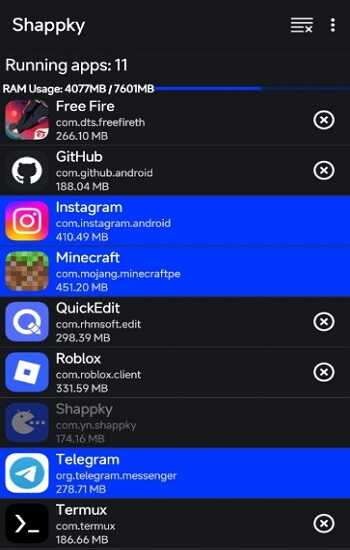
The strength of Shappky lies in its focus. It avoids unnecessary features and concentrates entirely on process control. When you open the app, you are presented with a clear list of running applications, along with information about their memory usage. This allows you to make informed decisions rather than relying on automated guesses.
Shappky APK is especially useful if you understand that performance issues often come from background activity rather than lack of space or outdated hardware. By offering manual, selective control, it allows you to manage your device responsibly instead of relying on aggressive or automated solutions that may cause unwanted side effects.
Why Background Apps Slow Down Android
Background apps are one of the most common reasons Android devices lose performance over time. Many apps are designed to keep services active even when they are not visible on the screen. These services may handle notifications, background syncing, location updates, or internal processes that are not obvious to the user.
RAM is usually the first resource affected. When multiple apps continue running in the background, available memory decreases. This forces Android to reload apps more often, which slows down app switching and makes the system feel less responsive. CPU usage also increases when several background processes run at the same time, especially on devices with limited hardware resources.
Battery drain is another direct result. Apps running in the background keep waking the processor, preventing the system from entering deeper power-saving states. Over time, this leads to inconsistent battery life and faster power loss, even when the device is idle. Heat generation follows naturally, as continuous background activity keeps internal components active longer than necessary.
Although modern Android versions attempt to manage background apps automatically, system restrictions are often relaxed to ensure app functionality. As a result, some apps continue running even when they are no longer needed. This is why manual control tools like Shappky APK become valuable when automatic management is not enough.
How Shappky APK Stops Background Apps
Shappky APK works by interacting directly with Android’s process management system. Instead of relying on basic user-level force stop actions, it allows selected processes to be terminated more effectively and immediately.
The app displays a list of running applications along with their current memory usage. From there, you can choose which apps to stop based on real usage data rather than guesswork. This selective approach reduces the risk of disrupting essential services while still freeing system resources.
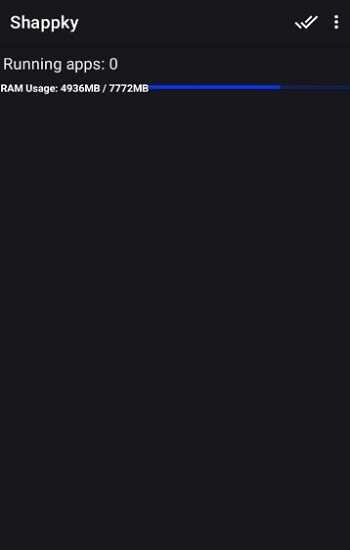
Unlike navigating through Android settings to force stop apps one by one, Shappky provides a faster and more consistent workflow. Once an app is stopped, the freed RAM and system resources become available right away. This can lead to smoother performance, faster app switching, and more stable multitasking.
Advertisement
Advertisement
This approach is especially helpful on devices with limited RAM or on phones that have accumulated many installed apps over time. By stopping only what is necessary, Shappky helps restore balance without creating instability.
Root Mode vs Shizuku Mode
One of the reasons Shappky APK attracts advanced and intermediate Android users is its flexible permission system. Instead of forcing a single approach, Shappky allows you to choose between Root mode and Shizuku mode based on your device setup and personal comfort level. This choice matters because it directly affects how deeply the app can interact with running processes and how safely it operates on your system.
Understanding the difference between these two modes helps you use Shappky more effectively and avoid unnecessary risks. Each mode serves a specific type of user, and neither is presented as a universal solution for everyone.
What Root Mode Does in Shappky APK
Root mode gives Shappky the highest level of system access available on Android. With root permissions, the app can interact directly with low-level processes, allowing it to stop background apps more aggressively and consistently. This level of access ensures that selected apps are fully terminated rather than temporarily paused.
Root mode is designed for users who already have rooted devices and understand how system permissions work. It offers the strongest control over background activity, especially when dealing with stubborn apps that tend to restart on their own.
However, Shappky does not encourage rooting a device just to use this mode. Root access changes how Android handles security and system integrity. If you are not already familiar with rooted environments, Shizuku mode is usually the better option.
How Shizuku Mode Works Without Root
Shizuku mode provides elevated permissions without requiring root access. It works by using Android’s debugging interface to grant temporary system-level permissions to apps that support it. This approach allows Shappky APK to stop background apps effectively while keeping the system unchanged.
For most users, Shizuku mode offers the best balance between control and safety. It allows Shappky to manage running processes with enough authority to make a real difference, without introducing permanent system changes. Once set up, the experience feels smooth and reliable.
This mode is especially useful if you want advanced app control but prefer to keep your device in its original state. It delivers meaningful performance improvements without increasing long-term risk.
Root vs Shizuku: Key Differences
The main difference between Root and Shizuku lies in permission depth and system impact. Root mode provides unrestricted access, which results in stronger control but also higher responsibility. Shizuku mode offers controlled access that is sufficient for most use cases.
Another difference is setup complexity. Root mode requires device-level changes, while Shizuku relies on temporary permission grants. Stability also varies depending on usage, with Shizuku generally being more predictable for everyday management.
Both modes aim to achieve the same goal: stopping unnecessary background apps. The difference lies in how much control you want and how comfortable you are managing system-level permissions.
Which Mode Is Better for Most Users
For the majority of users, Shizuku mode is the recommended choice. It delivers noticeable performance improvements without compromising system stability. Devices with limited RAM or older hardware benefit greatly from Shizuku-based process control.
Root mode is more suitable for experienced users who already manage rooted devices and require maximum flexibility. Shappky’s design ensures that you are not forced into one option, allowing you to choose the mode that fits your needs.
Advertisement
Performance Impact of Each Mode
Both Root and Shizuku modes result in smoother performance, reduced RAM usage, and more stable multitasking. Root mode may show slightly stronger effects in specific scenarios, but Shizuku mode is more than sufficient for daily use.
Battery behavior and device temperature also improve when background apps are properly managed. By reducing unnecessary wake-ups, both modes help create a more consistent user experience.
Safety Considerations When Using Root or Shizuku
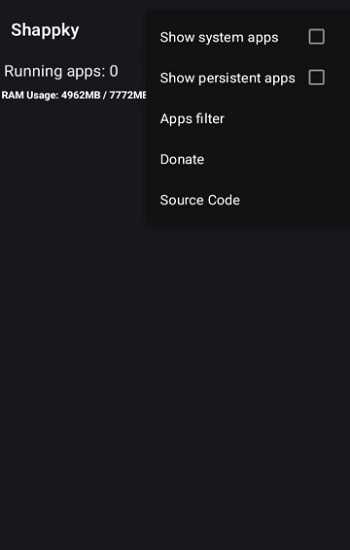
Regardless of the mode you choose, responsible usage is essential. Stopping critical system apps can lead to instability. Shappky helps prevent this by marking protected apps and limiting dangerous actions.
If you use automatic stopping features, it is best to start with non-essential apps and observe how your device responds. Careful configuration ensures performance gains without unwanted side effects.
Key Features of Shappky APK
Shappky APK includes a set of focused features designed to support precise process management. Selective app control allows you to stop only the apps you choose, rather than applying broad actions that may cause issues.
The RAM usage display helps you identify which apps consume the most memory, making it easier to decide what should be stopped. Protected system apps are visually distinguished, reducing the risk of accidental termination.
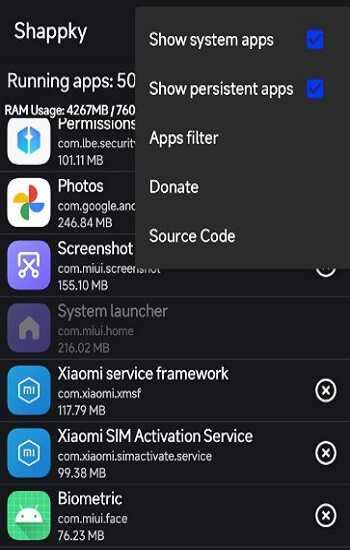
An optional background service can automate stopping actions for users who prefer passive management. Combined with a clean and minimal interface, these features make Shappky easy to understand and efficient to use.
How to Use Shappky APK Safely
Using Shappky safely starts with understanding which apps truly need to run in the background. Messaging apps, alarms, and essential system services usually need to remain active to function correctly.
A good approach is to begin by stopping non-essential apps and monitoring how your device behaves. Automatic stopping options should be enabled gradually to avoid missed notifications or background tasks.
Shappky works best as a management tool rather than an aggressive, constant stopper. Thoughtful usage leads to better results and long-term stability.
Real Benefits You Can Notice
When used correctly, Shappky delivers clear and measurable benefits. Devices feel smoother during daily use, especially after long uptime periods. App switching becomes faster, and overall responsiveness improves.
Battery performance stabilizes as fewer apps continue running unnecessarily. Device temperature also becomes more consistent, which helps maintain performance during extended use.
These improvements are most noticeable on older devices and phones with limited memory, where background activity has a stronger impact.
Who Should Use Shappky APK
Shappky APK is ideal for users who experience performance issues caused by background apps and want direct control over running processes. It suits users who prefer manual management rather than relying entirely on automated system behavior.
Devices with limited RAM, heavy app usage, or long daily uptime benefit the most. If your Android device already performs well under default management, Shappky may not be necessary.
Is Shappky APK Worth Using
Shappky APK is worth using when background apps become a noticeable performance issue. It provides focused control without unnecessary features, making it a reliable utility for system management.
Rather than replacing Android’s built-in tools, Shappky complements them by offering deeper control when it is needed. Used responsibly, it supports long-term performance without compromising stability.
Final Thoughts
Shappky APK stands out because it focuses on a real problem and solves it directly. By stopping unnecessary background apps through Root or Shizuku, it gives you practical control over how your device uses system resources.
Its balanced approach makes it suitable for a wide range of users, from those seeking safer advanced control to experienced users managing rooted devices. When used with care, Shappky becomes a dependable tool for maintaining consistent Android performance over time.
FAQs Shappky
Shappky APK is used to stop unnecessary background apps on Android devices. It helps users control running processes more effectively, reduce RAM usage, stabilize battery performance, and improve overall system responsiveness without relying on generic optimization features.
No, Shappky APK does not require root access to work. It supports two modes: Root mode for rooted devices and Shizuku mode for non-rooted devices. Shizuku allows advanced process control without permanently modifying the system, making it suitable for most users.
Yes, Shappky APK is safe when used responsibly. The app visually protects important system apps and allows selective stopping instead of forcing all processes to close. Users should avoid stopping essential services such as messaging or system apps to maintain stability.
Yes, stopping unnecessary background apps can improve both battery stability and performance. By reducing RAM and CPU usage, devices often feel smoother, run cooler, and maintain more consistent battery behavior during daily use.
Shappky APK is best suited for users who experience lag, high background app activity, or limited RAM on their Android devices. It is especially helpful for users who want manual control over running apps rather than relying entirely on automatic system management.






Share Your Thoughts